श्रीकृष्ण जन्माष्टमी हिंदू धर्म के प्रमुख त्योहारों में से एक है। इस दिन भगवान श्रीकृष्ण के जन्म का उत्सव मनाया जाता है। आज के समय में लोग जन्माष्टमी के मौके पर सोशल मीडिया पोस्ट, WhatsApp DP, Instagram पोस्ट, Facebook पोस्ट और ब्लॉग के लिए सुंदर AI फोटो बनाना पसंद करते हैं।
अगर आप भी Krishna Janmashtami AI Photo बनाना चाहते हैं, तो कुछ आसान AI prompts की मदद से बेहद सुंदर, दिव्य और cinematic कृष्ण इमेज तैयार कर सकते हैं। इन prompts में भगवान कृष्ण का पारंपरिक रूप, मोरपंख, बांसुरी, वृंदावन का वातावरण और दिव्य प्रकाश शामिल किया जा सकता है।
इस लेख में आपको Krishna Janmashtami AI Photo Prompt, editing prompt, cinematic कृष्ण image ideas और image SEO की जानकारी आसान हिंदी में दी गई है।
Krishna Janmashtami AI Photo Prompt क्या है?
Krishna Janmashtami AI Photo Prompt एक ऐसा टेक्स्ट निर्देश है जिसे AI image generator में डालकर जन्माष्टमी से जुड़ी सुंदर तस्वीर बनाई जा सकती है।
एक अच्छे prompt में भगवान कृष्ण की appearance, कपड़े, मुकुट, मोरपंख, बांसुरी, background, lighting और image style जैसी चीजों का विवरण दिया जाता है।
Divine Krishna AI Photo Prompt
नीचे दिया गया prompt आप AI image generator में इस्तेमाल कर सकते हैं:
Prompt:
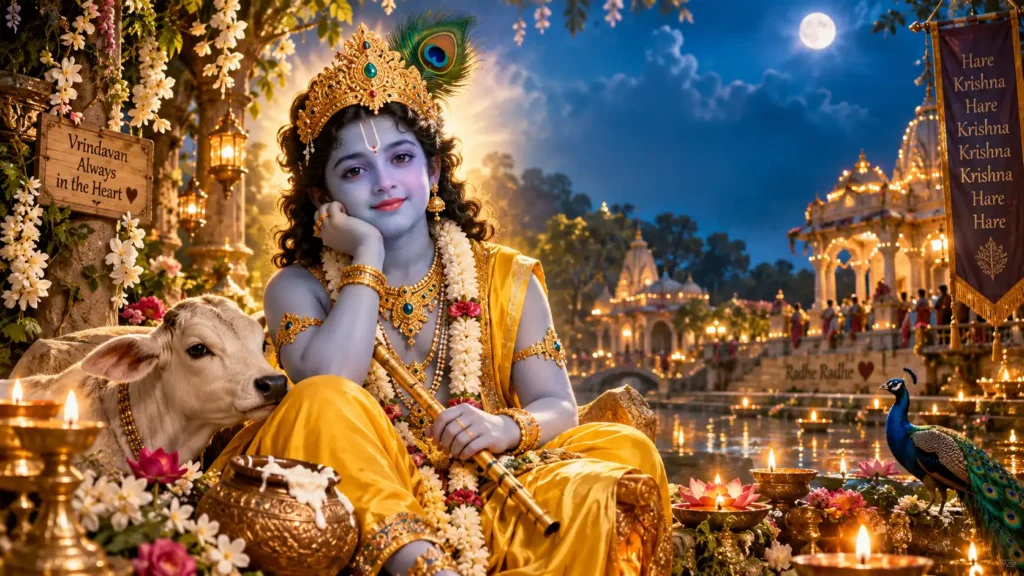
Create a divine and cinematic portrait of Lord Krishna celebrating Janmashtami, beautiful youthful Krishna with a peaceful and divine expression, wearing a traditional golden crown decorated with peacock feathers, elegant yellow dhoti, beautiful traditional jewelry, holding a wooden flute, soft divine golden aura around him, Vrindavan background with lush green trees, flowers and subtle temple architecture, glowing diyas, magical evening atmosphere, soft golden light, volumetric lighting, cinematic composition, highly detailed face, realistic skin texture, devotional atmosphere, spiritual energy, premium photography style, ultra detailed, sharp focus, 4K quality, realistic and majestic look, 16:9.
Janmashtami Krishna Image के लिए दूसरा Prompt
अगर आप थोड़ा ज्यादा colorful और festive कृष्ण image बनाना चाहते हैं, तो यह prompt इस्तेमाल कर सकते हैं:
Prompt:
A majestic Lord Krishna Janmashtami celebration scene, divine Krishna standing in beautiful Vrindavan, wearing a luxurious yellow traditional outfit, golden jewelry and an elegant peacock feather crown, holding a flute, surrounded by glowing diyas, colorful flowers and soft golden particles, beautiful temple in the background, moonlit night sky, divine blue aura, cinematic lighting, dramatic depth of field, realistic details, devotional and peaceful atmosphere, premium Indian festival photography, ultra realistic, highly detailed, 4K, 16:9.
Krishna Janmashtami Editing Prompt
अगर आपके पास पहले से कृष्ण की कोई AI-generated image है और उसमें बदलाव करना चाहते हैं, तो यह editing prompt इस्तेमाल कर सकते हैं:
Editing Prompt:
Enhance this Lord Krishna Janmashtami image with a more divine and cinematic appearance. Keep the original face and overall identity unchanged. Add a beautiful peacock feather crown, elegant traditional yellow clothing, subtle golden jewelry and a flute. Improve facial details and lighting while keeping the expression peaceful and divine. Add a soft golden aura, glowing diyas, flowers and a beautiful Vrindavan background. Create realistic cinematic lighting, natural shadows, depth of field and premium devotional photography style. Make the image highly detailed, sharp and realistic without changing the original composition unnecessarily.
Instagram और Facebook के लिए Krishna Photo Prompt
सोशल मीडिया पोस्ट के लिए portrait image बनानी हो तो यह prompt उपयोग कर सकते हैं:
Prompt:
Create a stunning devotional portrait of Lord Krishna for Janmashtami social media post, youthful divine Krishna with a calm smile, beautiful peacock feather crown, yellow traditional dhoti, golden ornaments and flute, glowing divine aura, soft bokeh background, Vrindavan temple atmosphere, flowers and diyas, cinematic golden lighting, realistic details, premium photography, emotional devotional mood, sharp focus, ultra detailed, 4K, vertical composition, 4:5 aspect ratio.
Krishna Janmashtami DP Prompt
WhatsApp या Facebook DP के लिए square image बनाने के लिए:
Prompt:
Create a divine Lord Krishna Janmashtami profile picture, close-up portrait of youthful Krishna, peaceful smile, beautiful peacock feather crown, traditional golden jewelry, yellow clothing, flute near his shoulder, soft blue and golden divine aura, dark cinematic background, glowing particles, realistic facial details, dramatic soft lighting, devotional atmosphere, premium portrait photography, ultra detailed, sharp focus, 4K, square composition.
AI Krishna Photo बनाते समय किन बातों का ध्यान रखें?
1. Face को Natural रखें
AI prompt में realistic facial details और natural expression लिखें। इससे image ज्यादा आकर्षक और natural दिखाई दे सकती है।
2. Traditional Look रखें
मोरपंख वाला मुकुट, पीले वस्त्र, बांसुरी और पारंपरिक आभूषण कृष्ण के traditional look को बेहतर बनाते हैं।
3. Background सही चुनें
वृंदावन, मंदिर, फूल, पेड़, यमुना किनारा और दीपक जैसे elements image को ज्यादा devotional और festive बना सकते हैं।
4. Lighting का इस्तेमाल करें
Golden light, moonlight, soft glow और volumetric lighting जैसे शब्द cinematic effect बनाने में मदद कर सकते हैं।
5. Image Ratio पहले तय करें
Blog thumbnail के लिए 16:9, Instagram post के लिए 4:5 और DP के लिए 1:1 ratio उपयोग करना बेहतर रहेगा।
Krishna Janmashtami AI Photo के लिए Negative Prompt
अगर आपका AI image tool negative prompt support करता है, तो आप यह इस्तेमाल कर सकते हैं:
Negative Prompt:
blurry image, low quality, distorted face, extra fingers, extra hands, deformed hands, bad anatomy, duplicate person, unnatural eyes, distorted jewelry, oversaturated colors, cropped head, text, watermark, logo, low resolution, unrealistic face, duplicate objects.
FAQs
1. Krishna Janmashtami AI Photo Prompt क्या है?
यह एक text prompt है जिसकी मदद से AI image generator भगवान कृष्ण और जन्माष्टमी से जुड़ी सुंदर तस्वीर बना सकता है।
2. Krishna AI Photo के लिए कौन सा background अच्छा रहेगा?
वृंदावन, मंदिर, यमुना किनारा, फूलों से सजा वातावरण और glowing diyas जैसे backgrounds अच्छे विकल्प हैं।
3. Blog Thumbnail के लिए कौन सा image size सही है?
Blog thumbnail के लिए 16:9 ratio सबसे उपयोगी रहता है। आप 1280×720 pixels का size इस्तेमाल कर सकते हैं।
4. क्या AI से Krishna Janmashtami DP बनाई जा सकती है?
हां, AI prompt की मदद से WhatsApp और Facebook के लिए square Krishna DP बनाई जा सकती है।
5. Krishna image को ज्यादा cinematic कैसे बनाएं?
Prompt में cinematic lighting, volumetric light, depth of field, soft golden glow, dramatic composition और ultra detailed जैसे terms शामिल कर सकते हैं।
6. क्या AI Krishna image को edit किया जा सकता है?
हां, image editing tools की मदद से background, lighting, clothing, jewelry और अन्य visual elements को बदला या बेहतर किया जा सकता है।
Conclusion
Krishna Janmashtami AI Photo Prompt की मदद से आप जन्माष्टमी के लिए सुंदर, दिव्य और cinematic भगवान कृष्ण की तस्वीरें आसानी से बना सकते हैं। चाहे आपको blog thumbnail, WhatsApp DP, Instagram post या Facebook image बनानी हो, सही prompt और image ratio का इस्तेमाल करने से बेहतर परिणाम मिल सकता है।
ऊपर दिए गए prompts को आप अपनी जरूरत के अनुसार बदल सकते हैं और background, lighting तथा style में अलग-अलग बदलाव करके अपनी पसंद की Krishna Janmashtami AI Photo तैयार कर सकते हैं।