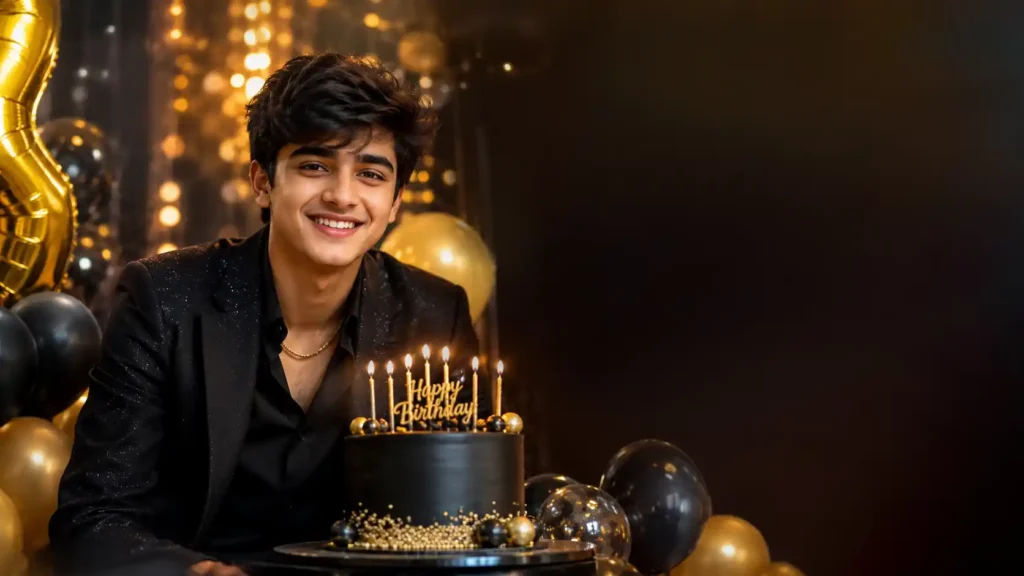
आजकल AI Photo Editing की मदद से साधारण फोटो को भी एक शानदार और स्टाइलिश Birthday फोटो में बदला जा सकता है। खासकर लड़कों के लिए Birthday AI Photo Editing Prompt की मदद से फोटो में Birthday Decoration, Balloons, Cake, Lights, Stylish Outfit और Cinematic Background जैसे कई शानदार Effects जोड़े जा सकते हैं।
अगर आप अपनी Birthday Photo को Instagram, Facebook, WhatsApp या किसी दूसरी सोशल मीडिया प्रोफाइल पर शेयर करना चाहते हैं, तो यह AI Photo Editing Prompt आपके लिए काफी उपयोगी हो सकता है।
इस आर्टिकल में आपको Birthday AI Photo Editing Prompt for Boys 2026, फोटो एडिट करने का आसान तरीका, अलग-अलग Birthday Editing Ideas, FAQs और Thumbnail Prompt की जानकारी मिलेगी।
Birthday AI Photo Editing Prompt क्या है?
Birthday AI Photo Editing Prompt एक ऐसा Text Prompt होता है, जिसे AI Photo Editing Tool में डालकर किसी फोटो का लुक बदला जा सकता है।
इस Prompt की मदद से आपकी Original Photo में चेहरे की पहचान और नेचुरल लुक को बनाए रखते हुए Birthday Theme, Cake, Balloons, Background Lights, Stylish Clothes और Cinematic Effects जैसी चीजें जोड़ी जा सकती हैं।
2026 में AI Photo Editing के बढ़ते इस्तेमाल के कारण इस तरह के Creative Birthday Prompts सोशल मीडिया फोटो बनाने के लिए काफी उपयोगी हैं।
Boys के लिए Birthday AI Photo Editing Prompt 2026
अगर आप किसी लड़के की Birthday Photo को Stylish और Premium Look देना चाहते हैं, तो नीचे दिया गया Prompt इस्तेमाल कर सकते हैं।
Main Birthday Photo Editing Prompt
Prompt:
Create a high-quality realistic birthday portrait of the same boy from the reference photo. Keep his face, facial features, skin tone, hairstyle, body proportions and identity natural and unchanged. Give him a stylish modern birthday outfit with a premium and youthful look. Add an elegant birthday cake, colorful balloons, soft glowing birthday lights and beautiful party decorations in the background. Create a luxurious cinematic birthday atmosphere with warm lighting, realistic shadows, natural skin texture and detailed surroundings. Add subtle bokeh lights and a premium studio photography effect. Make the image photorealistic, sharp, high resolution and social-media ready. Do not change the person’s identity or facial structure. Avoid artificial skin, extra fingers, distorted hands, duplicate objects, blurry face and unnatural body proportions.
Stylish Birthday AI Photo Prompt for Boys
अगर आपको Simple Birthday Photo की जगह थोड़ा ज्यादा Stylish और Modern Look चाहिए, तो यह Prompt इस्तेमाल कर सकते हैं।
Transform the reference photo into a stylish modern birthday portrait for a young boy. Preserve the exact facial identity, natural skin tone, hairstyle and facial details. Add a fashionable black or dark-colored outfit, elegant birthday decorations, black and gold balloons, a premium birthday cake and cinematic warm lights. Create a luxury party background with soft golden bokeh and realistic depth of field. Use professional portrait photography, realistic shadows, detailed skin texture, natural lighting and high-resolution quality. Keep the face realistic and unchanged. Make the final image elegant, confident, stylish and suitable for Instagram and social media.
Simple Birthday Photo Editing Prompt
अगर आपको ज्यादा Decoration पसंद नहीं है और Simple Birthday Photo बनानी है, तो यह Prompt इस्तेमाल कर सकते हैं।
Create a realistic and elegant birthday portrait from the reference image. Keep the boy’s original face, hairstyle, skin tone and identity unchanged. Add a simple birthday cake, a few balloons and soft warm birthday lights in the background. Use a clean modern party setup with natural colors and realistic lighting. Create a professional DSLR photography look with soft background blur, natural skin texture and sharp facial details. Keep the image realistic, clean and high quality.
Black Outfit Birthday Photo Prompt
Black Outfit में Birthday Photo काफी Stylish दिखाई दे सकती है।
Create a cinematic birthday portrait of the same boy wearing a stylish black outfit. Preserve his original face, hairstyle, skin tone and identity exactly. Add black and golden balloons, a premium birthday cake, warm golden lights and an elegant dark birthday party background. Use dramatic but natural cinematic lighting, realistic shadows, detailed skin texture and professional studio photography. Add subtle golden bokeh in the background. Make the final image photorealistic, stylish, premium and high resolution.
Birthday Cake के साथ AI Photo Prompt
अगर आप फोटो में Birthday Cake को Highlight करना चाहते हैं, तो इस Prompt का इस्तेमाल कर सकते हैं।
Create a realistic birthday celebration portrait using the reference photo. Keep the boy’s face and identity exactly the same. Place a beautiful personalized birthday cake in front of him with elegant candles and soft glowing lights. Add colorful balloons and a modern birthday decoration in the background. Use warm cinematic lighting, realistic shadows, natural skin texture and professional portrait photography. Make the cake detailed and realistic without covering the boy’s face. Create a joyful, premium and photorealistic birthday atmosphere.
AI से Birthday Photo कैसे Edit करें?
AI से Birthday Photo Edit करना बहुत आसान है। इसके लिए नीचे दिए गए Steps Follow करें।
Step 1: अपनी फोटो चुनें
सबसे पहले ऐसी फोटो चुनें जिसमें चेहरा साफ दिखाई दे। अच्छी रोशनी वाली High-Quality Photo का इस्तेमाल करने पर Result बेहतर मिल सकता है।
Step 2: AI Photo Editing Tool खोलें
किसी ऐसे AI Photo Editing Tool का इस्तेमाल करें जिसमें Reference Image Upload करने और Text Prompt देने की सुविधा हो।
Step 3: फोटो Upload करें
अपनी Original Photo को AI Tool में Upload करें। कोशिश करें कि फोटो में चेहरा ज्यादा Blur या Covered न हो।
Step 4: Birthday Prompt डालें
ऊपर दिए गए Birthday AI Photo Editing Prompt में से अपनी पसंद का Prompt Copy करके AI Tool में डालें।
Step 5: Image Generate करें
अब Generate या Create विकल्प पर क्लिक करें। AI आपकी फोटो को दिए गए Prompt के अनुसार Birthday Theme में Edit करेगा।
Step 6: Result को Check करें
AI द्वारा तैयार फोटो में चेहरा, हाथ, कपड़े और Background को ध्यान से देखें। अगर कोई चीज Natural नहीं लग रही है, तो Prompt में उसे सुधारने के लिए दोबारा निर्देश दें।
बेहतर Birthday AI Photo बनाने के लिए Tips
AI से अच्छी Birthday Photo बनाने के लिए कुछ बातों का ध्यान रखना जरूरी है।
- हमेशा साफ और High-Quality फोटो इस्तेमाल करें।
- चेहरे वाली फोटो में अच्छी Lighting होनी चाहिए।
- Prompt में Face Identity को Preserve करने की बात जरूर लिखें।
- बहुत ज्यादा Elements जोड़ने से बचें।
- Natural Skin Texture रखने का निर्देश दें।
- Hands और Fingers को Realistic रखने के लिए Prompt में स्पष्ट निर्देश दें।
- अलग-अलग Background और Outfit के साथ Experiment कर सकते हैं।
- Social Media पर शेयर करने के लिए Portrait और High-Resolution Image बेहतर विकल्प हो सकता है।
Birthday AI Photo Editing Prompt 2026 क्यों लोकप्रिय है?
AI Photo Editing ने फोटो को Creative बनाने का तरीका काफी आसान कर दिया है। अब किसी Professional Photo Studio की तरह Birthday Theme बनाने के लिए सिर्फ एक अच्छी फोटो और सही Prompt की जरूरत हो सकती है।
Boys के लिए Black-Gold Theme, Cinematic Lighting, Luxury Birthday Setup, Casual Party Look और Simple Birthday Portrait जैसे अलग-अलग Styles बनाए जा सकते हैं।
FAQs
Birthday AI Photo Editing Prompt क्या है?
Birthday AI Photo Editing Prompt एक Text Instruction है, जिसे AI Image या Photo Editing Tool में इस्तेमाल करके फोटो को Birthday Theme में बदला जा सकता है।
क्या AI से लड़कों की Birthday Photo बनाई जा सकती है?
हां, AI Photo Editing Tools की मदद से लड़कों की फोटो को Birthday Theme, Cake, Balloons, Lights और अलग-अलग Background के साथ Edit किया जा सकता है।
क्या AI Photo में चेहरा वही रखा जा सकता है?
अगर इस्तेमाल किया गया AI Tool Reference Image और Identity Preservation को अच्छी तरह सपोर्ट करता है, तो Prompt में Original Face और Identity को Preserve करने के लिए कहा जा सकता है। फिर भी हर Tool का Result अलग हो सकता है।
Birthday Photo के लिए कौन सा Outfit अच्छा रहेगा?
Black Shirt, Black Suit, Casual Jacket, White Shirt या Smart Party Outfit Birthday Photo के लिए अच्छे विकल्प हो सकते हैं। आप अपनी पसंद के अनुसार Prompt में Outfit बदल सकते हैं।
क्या Birthday AI Photo Instagram पर शेयर कर सकते हैं?
हां, AI से बनाई गई Birthday Photo को सोशल मीडिया पर शेयर किया जा सकता है। हालांकि, जिस AI Tool का आप इस्तेमाल कर रहे हैं, उसकी Terms और Content Policies को ध्यान में रखना चाहिए।
AI Birthday Photo को ज्यादा Realistic कैसे बनाएं?
Prompt में “photorealistic”, “natural skin texture”, “realistic lighting”, “natural facial features” और “professional portrait photography” जैसे निर्देश देने से अधिक Natural Look पाने में मदद मिल सकती है।
Conclusion
Birthday AI Photo Editing Prompt for Boys 2026 की मदद से आप अपनी साधारण फोटो को एक शानदार और Creative Birthday Portrait में बदल सकते हैं। आप Black-Gold Theme, Cake, Balloons, Cinematic Lights या Simple Birthday Background में से अपनी पसंद का Style चुन सकते हैं।
सबसे जरूरी बात यह है कि AI Photo Edit करते समय Original Face, Natural Skin Texture और Realistic Body Proportions को बनाए रखने का निर्देश दें। इससे फोटो ज्यादा Natural और Professional दिखाई दे सकती है।
अगर आप Birthday के लिए एक नई और Stylish Photo बनाना चाहते हैं, तो ऊपर दिए गए Prompts को अपनी फोटो के अनुसार Customize करके इस्तेमाल कर सकते हैं।