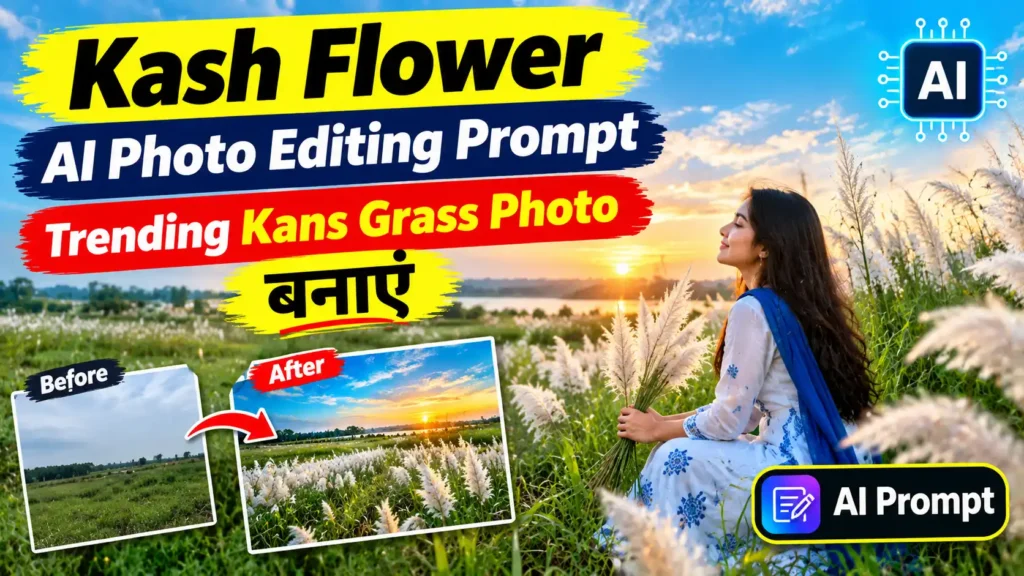
शरद ऋतु आते ही सफेद काश फूलों की खूबसूरत तस्वीरें सोशल मीडिया पर तेजी से वायरल होने लगती हैं। काश के फूलों के बीच खींची गई तस्वीरें देखने में काफी आकर्षक लगती हैं। अगर आपके पास काश के मैदान में फोटो खिंचवाने का मौका नहीं है, तो अब AI Photo Editing Prompt की मदद से अपनी सामान्य फोटो को भी एक खूबसूरत Kash Flower Portrait में बदला जा सकता है।
इस आर्टिकल में आपको एक ऐसा आसान Kash Flower AI Photo Editing Prompt मिलेगा, जिसे आप AI Photo Editing Tool में इस्तेमाल करके अपनी फोटो को काश के फूलों से भरे प्राकृतिक मैदान जैसा लुक दे सकते हैं।
Kash Flower AI Photo Editing Prompt क्या है?
Kash Flower AI Photo Editing Prompt एक ऐसा AI Prompt है, जिसकी मदद से आपकी सामान्य फोटो के बैकग्राउंड और वातावरण को बदलकर उसे सफेद काश फूलों से भरे मैदान में दिखाया जा सकता है।
AI आपकी फोटो में मौजूद व्यक्ति के चेहरे, कपड़ों और मुख्य लुक को बनाए रखते हुए आसपास का वातावरण बदल सकता है। सही Prompt देने पर फोटो में Natural Lighting, Soft Background और Cinematic Portrait जैसा प्रभाव भी बनाया जा सकता है।
अपनी Photo को Kash Flower Portrait कैसे बनाएं?
Step 1: अपनी Photo चुनें
सबसे पहले ऐसी फोटो चुनें जिसमें आपका चेहरा साफ दिखाई दे। अच्छी रोशनी वाली High Quality Photo इस्तेमाल करने से AI Editing का परिणाम बेहतर मिल सकता है।
Step 2: AI Photo Editing Tool खोलें
किसी ऐसे AI Image Editing Tool का इस्तेमाल करें जिसमें अपनी फोटो Upload करके Prompt के जरिए Editing करने की सुविधा मिलती हो।
Step 3: Photo Upload करें
अपनी पसंद की फोटो AI Tool में Upload करें और नीचे दिए गए Kash Flower AI Photo Editing Prompt को Prompt Box में डालें।
Step 4: AI Image Generate करें
Prompt डालने के बाद Image Generate या Edit विकल्प पर क्लिक करें। AI आपकी फोटो को काश के फूलों वाले प्राकृतिक वातावरण में बदल देगा।
Kash Flower AI Photo Editing Prompt
नीचे दिया गया Prompt अपनी Photo के साथ इस्तेमाल कर सकते हैं:
Editing Prompt:
“Transform this photo into a beautiful realistic portrait taken in a vast field of blooming white Kans grass (Kash flowers) during the autumn season. Keep the person’s face, facial features, skin tone, hairstyle, body proportions and identity exactly the same as the original photo. Surround the person with tall, soft white Kans grass flowers moving gently in the breeze. Create a peaceful Bengali autumn atmosphere with warm natural sunlight, soft golden-hour lighting, subtle background blur, cinematic depth of field and realistic shadows. Make the image look natural, elegant, photorealistic and premium. Preserve the original outfit and overall appearance of the person. Add a dreamy yet realistic seasonal atmosphere, high details, natural skin texture, realistic colors, professional portrait photography, 4K quality. Do not change the person’s face or identity and do not add any text, watermark or logo.”
Trending Kash Flower Photo के लिए Prompt में क्या होना चाहिए?
अगर आप ज्यादा आकर्षक और Natural Result चाहते हैं, तो Prompt में इन चीजों का उल्लेख कर सकते हैं:
- White Kans Grass / Kash Flowers
- Autumn Season
- Golden Hour Lighting
- Natural Sunlight
- Cinematic Background
- Soft Depth of Field
- Photorealistic Details
- Natural Skin Texture
- Professional Portrait Photography
- 4K High Resolution
Kash Flower Photo को ज्यादा Realistic कैसे बनाएं?
AI से फोटो Edit करते समय केवल बैकग्राउंड बदलना पर्याप्त नहीं है। अगर आप ज्यादा Realistic Result चाहते हैं, तो Prompt में Original Face और Identity को Preserve करने की बात जरूर लिखें।
इसके अलावा Natural Lighting, Realistic Shadows, Depth of Field और Natural Skin Texture जैसे शब्द AI को बेहतर परिणाम देने में मदद कर सकते हैं।
Kash Flower AI Photo का Trending Look
काश फूलों वाली फोटो को आप अलग-अलग स्टाइल में भी बना सकते हैं। उदाहरण के लिए Golden Hour Portrait, Cinematic Portrait, Traditional Bengali Autumn Look या Soft Romantic Portrait जैसे अलग-अलग Visual Styles इस्तेमाल किए जा सकते हैं।
आप अपने कपड़ों और Pose को भी अपनी पसंद के अनुसार रख सकते हैं। इससे एक सामान्य फोटो को Social Media के लिए आकर्षक Seasonal Portrait में बदला जा सकता है।
AI Photo Editing के लिए जरूरी Tips
- हमेशा साफ और High Quality फोटो का इस्तेमाल करें।
- चेहरे पर पर्याप्त रोशनी वाली फोटो चुनें।
- Prompt में यह जरूर बताएं कि व्यक्ति का चेहरा और Identity नहीं बदलनी चाहिए।
- Background को Natural रखने के लिए Realistic Lighting और Shadows का इस्तेमाल करें।
- बहुत ज्यादा Artificial Effects इस्तेमाल करने से फोटो कम Natural लग सकती है।
- अलग-अलग Prompts के साथ Experiment करके अपनी पसंद का Result तैयार करें।
FAQs
Kash Flower AI Photo Editing Prompt क्या है?
यह एक AI Prompt है जिसकी मदद से सामान्य फोटो को सफेद काश फूलों से भरे प्राकृतिक मैदान में खींची गई Portrait Photo जैसा बनाया जा सकता है।
क्या Kash Flower Prompt से चेहरा बदलेगा?
सही Prompt में Face, Facial Features और Identity Preserve करने का निर्देश देने पर AI को मूल चेहरे को बनाए रखने के लिए कहा जा सकता है। हालांकि अलग-अलग AI Tools में Result अलग हो सकता है।
Kash Flower Photo के लिए कैसी Photo इस्तेमाल करें?
Clear Face, Good Lighting और High Resolution वाली फोटो इस्तेमाल करना बेहतर रहता है।
क्या इस Prompt को Mobile से इस्तेमाल किया जा सकता है?
हां, अगर आपके इस्तेमाल किए गए AI Photo Editing Tool में Image Upload और Prompt-Based Editing की सुविधा उपलब्ध है, तो आप Mobile से भी इसका इस्तेमाल कर सकते हैं।
क्या Kash Flower Photo को Cinematic बनाया जा सकता है?
हां। Prompt में Cinematic Lighting, Depth of Field, Golden Hour और Professional Portrait Photography जैसे निर्देश जोड़कर Cinematic Look बनाया जा सकता है।
Conclusion
काश फूलों के बीच फोटो खिंचवाना शरद ऋतु की खूबसूरत यादों में से एक है। लेकिन अगर आपके पास काश के मैदान में फोटो लेने का मौका नहीं है, तो AI Photo Editing की मदद से अपनी सामान्य फोटो को भी Trending Kash Flower Portrait में बदला जा सकता है।
ऊपर दिया गया Kash Flower AI Photo Editing Prompt इस्तेमाल करके आप अपनी फोटो में सफेद काश फूल, प्राकृतिक रोशनी, Cinematic Background और Autumn Season का खूबसूरत वातावरण जोड़ सकते हैं। बेहतर Result के लिए हमेशा साफ और High Quality Photo का इस्तेमाल करें।